A display the speaker can actually see
A phone timer helps only the person holding it. A shared speech timer can run on a confidence monitor, projector, second laptop, or browser window so the speaker sees the same countdown as the host.
Speech timer
Create a host-controlled online speech timer with a full-screen speaker display, clear wrap-up cues, overtime tracking, and simple agenda timing.
Real speaking situations
In a real room, a speech timer is not just a countdown. It is a coordination signal between the speaker, the host, the producer, and anyone watching the schedule.
A private phone timer can be missed.
A spreadsheet can plan the agenda, but it will not keep the room synchronized once the speaker starts talking.
A practical speech room flow
In many speaking sessions, the timing problem starts before the talk begins. The host has a schedule, the speaker has a time limit, and the audience expects the session to move on without awkward interruptions.
If the only timer is on a phone or laptop near the host, the speaker may not notice the warning until the talk is already over time.
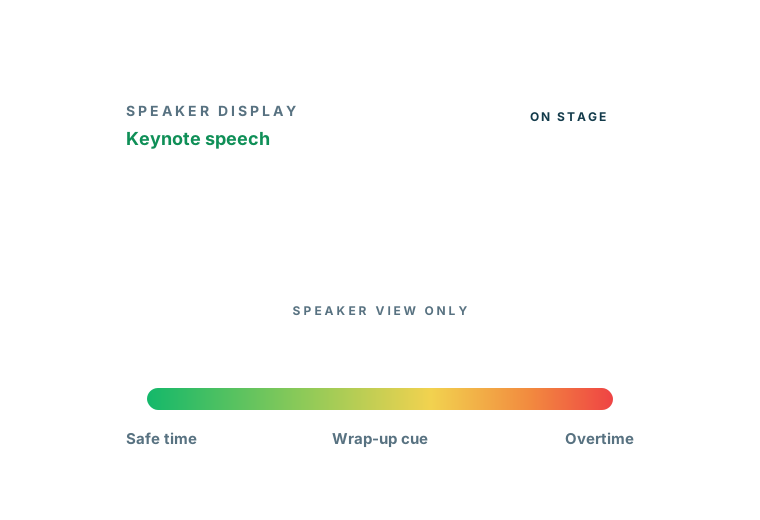
PresentationTimer keeps the roles separate. The host opens the control page and manages the room. The speaker, producer, classroom, or stage display opens a clean read-only link. That display can sit on a confidence monitor, projector, webinar screen share, or second browser window.
Everyone follows the same active timer without exposing the host controls.
When the session has more than one part, the room can hold a small agenda. A host can set up a speech timer, a Q&A timer, and a transition timer before the session starts.
Linked Start can move the room from one segment to the next, while manual control stays available when a speaker needs extra time or the room changes direction.
The result is a calmer room. The speaker sees a large, readable countdown. The host keeps control of the agenda. The audience gets a timing system that feels obvious instead of hidden.
Why PresentationTimer
The speaker should not have to manage the clock while speaking.
The host should not have to interrupt with hand signals every time the talk approaches the limit.
PresentationTimer separates the control surface from the display, so the timekeeper can manage timing while the speaker sees only what matters.
A phone timer helps only the person holding it. A shared speech timer can run on a confidence monitor, projector, second laptop, or browser window so the speaker sees the same countdown as the host.
The timekeeper can start, pause, reset, rename, reorder, and switch timers from the host view while the display stays clean and readable for the speaker.
Green, yellow, red, and overtime states give speakers a simple visual signal. The host does not need to wave, whisper, or cut into the speech to explain how much time remains.
How it works
The page flow is built around the way speaking sessions actually run: create the room, prepare the agenda, share a display, and adjust live when the room changes.
You can use a single timer for one talk or a small agenda for a speech followed by Q&A, critique, or the next presenter.
Open PresentationTimer and create a free room. The host gets the control page, and the display link is ready to share with a speaker screen or second device.
Add timers for the speech, Q&A, break, or next speaker. A simple agenda keeps the whole session in one room instead of spreading timing across separate browser tabs.
Open the display link where the speaker can see it. The display follows the active timer and stays free of host controls, settings, and editing UI.
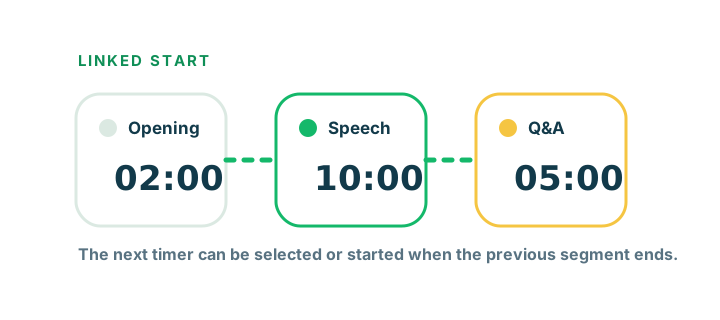
For back-to-back segments, link the next timer so it is selected or started after the previous timer ends. The host can still override manually whenever the room changes live.
Agenda and Linked Start
Many speaking sessions are more than one countdown. A host may need an opening timer, a speech timer, a Q&A timer, and a short transition before the next speaker.
Instead of creating separate rooms or relying on a spreadsheet, PresentationTimer keeps those timers inside one agenda room.
Linked Start helps when the flow is predictable. The next timer can be selected after the previous timer ends, or it can start automatically.
If the room changes, the host can still click a different timer and take control manually.
Comparison
Phone timer
Private, easy to miss, and hard to share with a speaker or remote producer.
Spreadsheet agenda
Good for planning, but it does not give the room a synchronized countdown display.
Generic online timer
Useful for one countdown, but usually lacks host/display separation and agenda flow.
PresentationTimer
Host-controlled speech timing with a shareable display, warning colors, overtime, and simple agenda timers.
Ready to time a speech?
Use PresentationTimer for one speech or a simple multi-segment speaking agenda.
The host controls timing, the display stays readable, and overtime remains visible when a talk runs long.
FAQ
A speech timer is a timer used to keep a talk, presentation, pitch, classroom speech, or speaking practice session within a set time limit. PresentationTimer adds a host control page, a shareable speaker display, warning colors, overtime tracking, and simple agenda timing.
Yes. The host controls the timer while the speaker follows a large display link on another screen, projector, confidence monitor, or browser window. Speakers do not need to install anything.
The host opens the room's host view to start, pause, reset, edit durations, rename timers, and switch the active timer. The public display remains read-only so the speaker only sees the countdown and room message.
Yes. A free room can hold a small agenda, so you can create one timer for the speech and another for Q&A, critique, transition time, or the next speaker.
Linked Start lets a timer connect to the previous timer. When one segment ends, the next timer can be selected automatically or started automatically, which is useful for speeches that move into Q&A or back-to-back speaking blocks.
Yes. The current version lets you create a free timer room in the browser. It is designed for lightweight talks, classes, demos, webinars, and live event sessions.
Yes. For club meetings that need green, yellow, and red remaining-time cues for Table Topics, prepared speeches, and evaluations, use the Toastmasters timer. Keep Host with the timer and open Display or Speaker view for the speaker.
Related